Preserving Phase-Specific Parameters when Copying FIDES Components
A copied component may have different phases than the place it is being pasted into. Starting in Version 2026, when copying FIDES components from one location to another - either within a folio, between folios in the same project or between folios in different projects - you have the ability to specify what happens with the phase-specific parameters.
When you paste the component(s), the FIDES Copy Phase Parameters window will appear. In this window, for each phase in the destination location, you will see the local and underlying phase titles (i.e., the "Destination Phase Title (for this location)" and the "Destination Phase Title" columns) and will be able to use the "Copy Component Parameters from Phase" column to specify where to draw the components' phase-specific parameters from. The list in this column contains the phases used in the source location. For each destination phase, either:
- Select the name of the source location's phase to use the parameters of.
OR
- Select NA to set phase parameters to defaults for the specified destination phase. (This is the functionality used in previous versions of the software.)
Click OK to set the parameters.
Example
For example, you are copying a component with defined phases "Phase 11", "Operating Phase", "Phase 33", and "Phase 88".
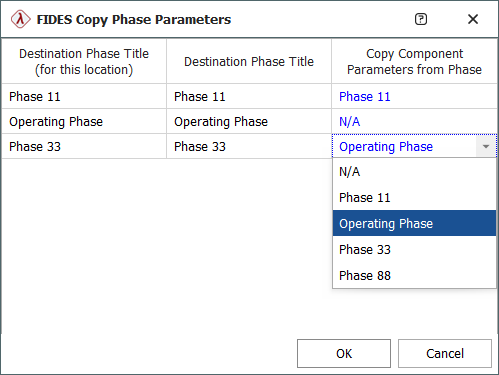
The destination location has definitions for phases "Phase 11", "Operating Phase", and "Phase 33".
By default (i.e., if all rows in the "Copy Component Parameters from Phase" column were left as N/A) all of the phase-specific parameters would be lost on paste.
The selected options shown would set the "Phase 11" phase parameters to the same ones the component had set for "Phase 11" in the original location. "Operating Phase" will be set to the defaults. "Phase 33" will be set to the phase parameters that the component had for "Operating Phase". The "Phase 33" and "Phase 88" parameters the component had are not copied to any destination phase.
Special Conditions
Some special conditions apply:
- If all the copied components have the same parent item and phase definitions (i.e., they are all from a single source location) then you only need to select a single option for each phase.
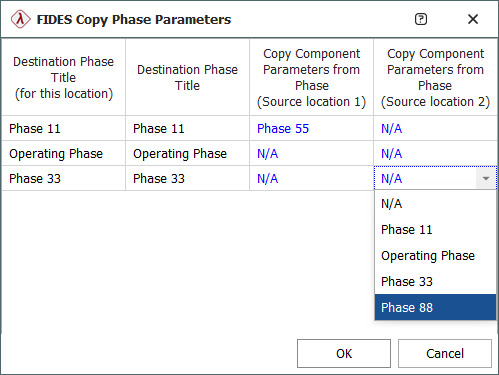
- If the copied components are from multiple source locations then you must select an option for each source location, as shown next.
- If the destination location has no phases assigned to it, the FIDES Copy Phase Parameters window will not appear and no phase-specific parameters will be copied with the components.